
Do I Need a Website for My Small Business?
A website should solve a business problem. Use these practical checks to decide whether to build now, start small, or wait.
A small business does not automatically need a website. It becomes more valuable when customers need information that existing channels do not provide clearly, or when the business needs a central place to explain its services and guide inquiries. The right decision depends on what customers need, how the business currently operates, and who can manage the website.
The important question is not how easily you can build a website, but whether it would solve a real problem for your business. Start by considering whether to build now, start small, or wait.
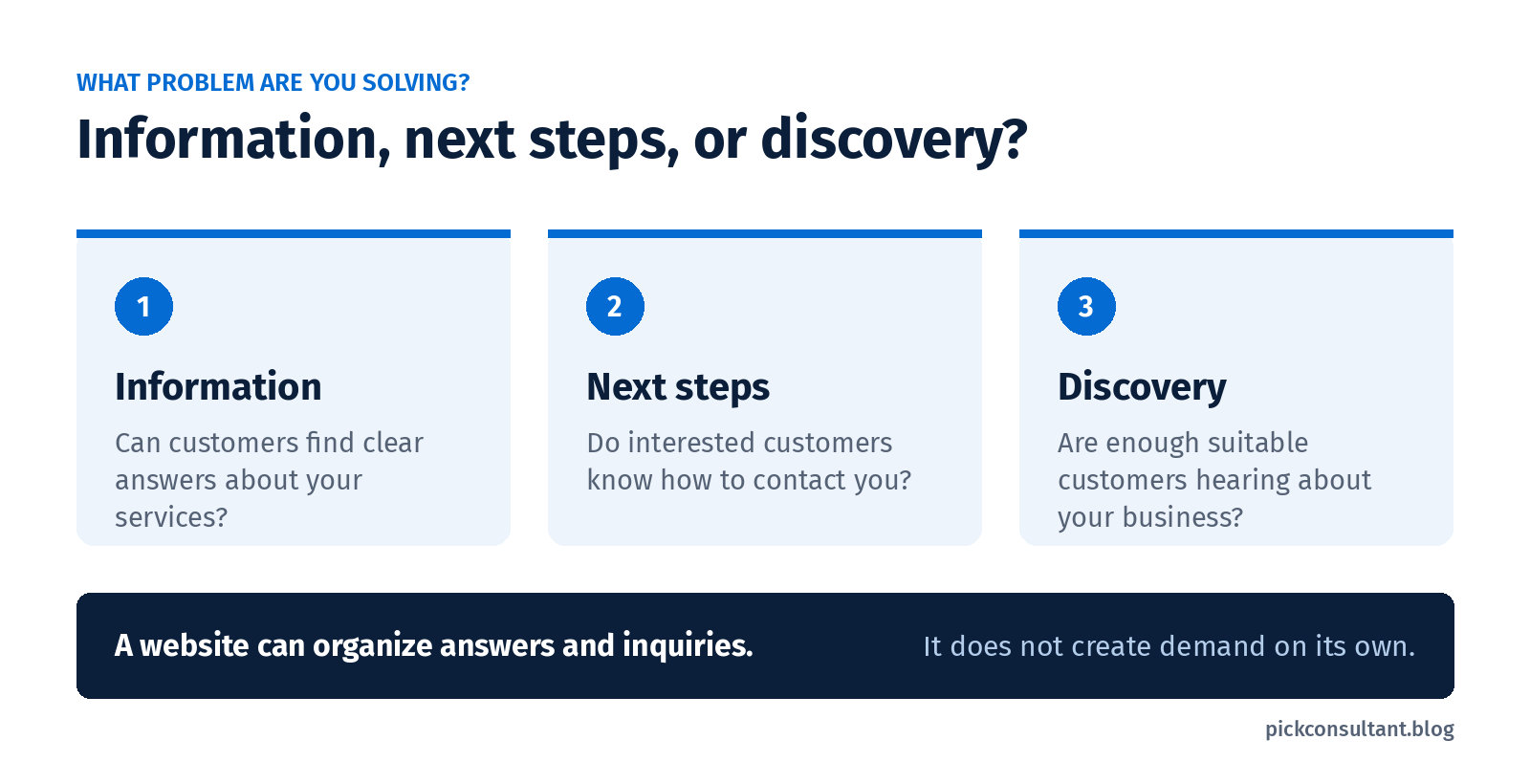
Build now, start small, or wait?
Think about the questions people ask before they hire you. Can they find clear answers without calling or messaging? Is the next step obvious? Would a website improve that experience enough to justify the work involved?
Use these situations as a starting point:
| Build now | Your offer is established, but customers regularly need information or an inquiry route that your existing channels do not handle clearly. Someone can manage the site and respond. | Define the website's purpose and requirements before choosing how to build it. |
| Start small | Your offer is established and straightforward. You mainly need basic service information and a clear way to contact you. | Identify the minimum useful information and contact route. Leave optional features for later. |
| Wait | Your offer is still changing, current channels meet your needs, or nobody can maintain the site and respond to inquiries. | Improve what you already use and set a reason to review the decision. |
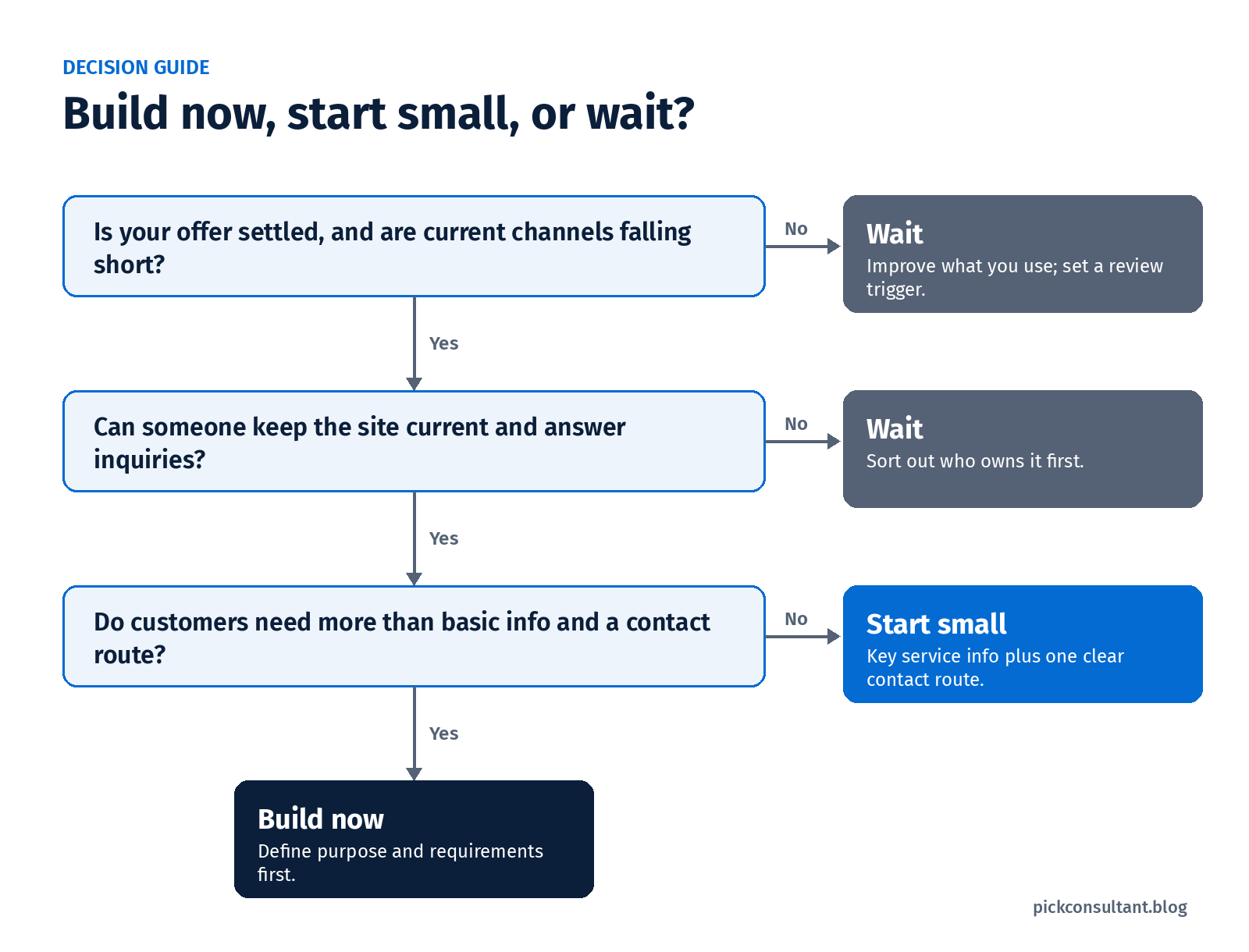
A website can make business information easier to access and provide a clearer inquiry route, but it does not automatically generate demand. Consider whether the immediate problem is missing information, an unclear customer journey, or a lack of customer discovery.
For example, repeated questions about your services may point to an information gap. Very few people hearing about your business is a different problem. A new site alone may not address it.
These choices are practical guidance, not a scoring system. Before committing to a build, check whether clearer information on your existing channels could solve the immediate issue.
![Three questions distinguish missing service information, an unclear contact route, and a lack of customer discovery. A website does not automatically generate demand.]
What can I use instead of a website?
Social profiles, a Google Business Profile, and suitable directories may cover some of your needs. Compare them by what they help you do, what information they present, and where they leave gaps.
Facebook or Instagram
A social profile can give people somewhere to see your work and interact with your business. For an owner already using it effectively, it may be a useful starting point.
Check whether a new visitor can readily find your services, service area, and contact details. If understanding the offer requires scrolling through posts or sending several messages, the format may be making basic information harder to find.
That does not mean you should stop using social media. It means you should decide whether it needs a clearer supporting destination.
Google Business Profile
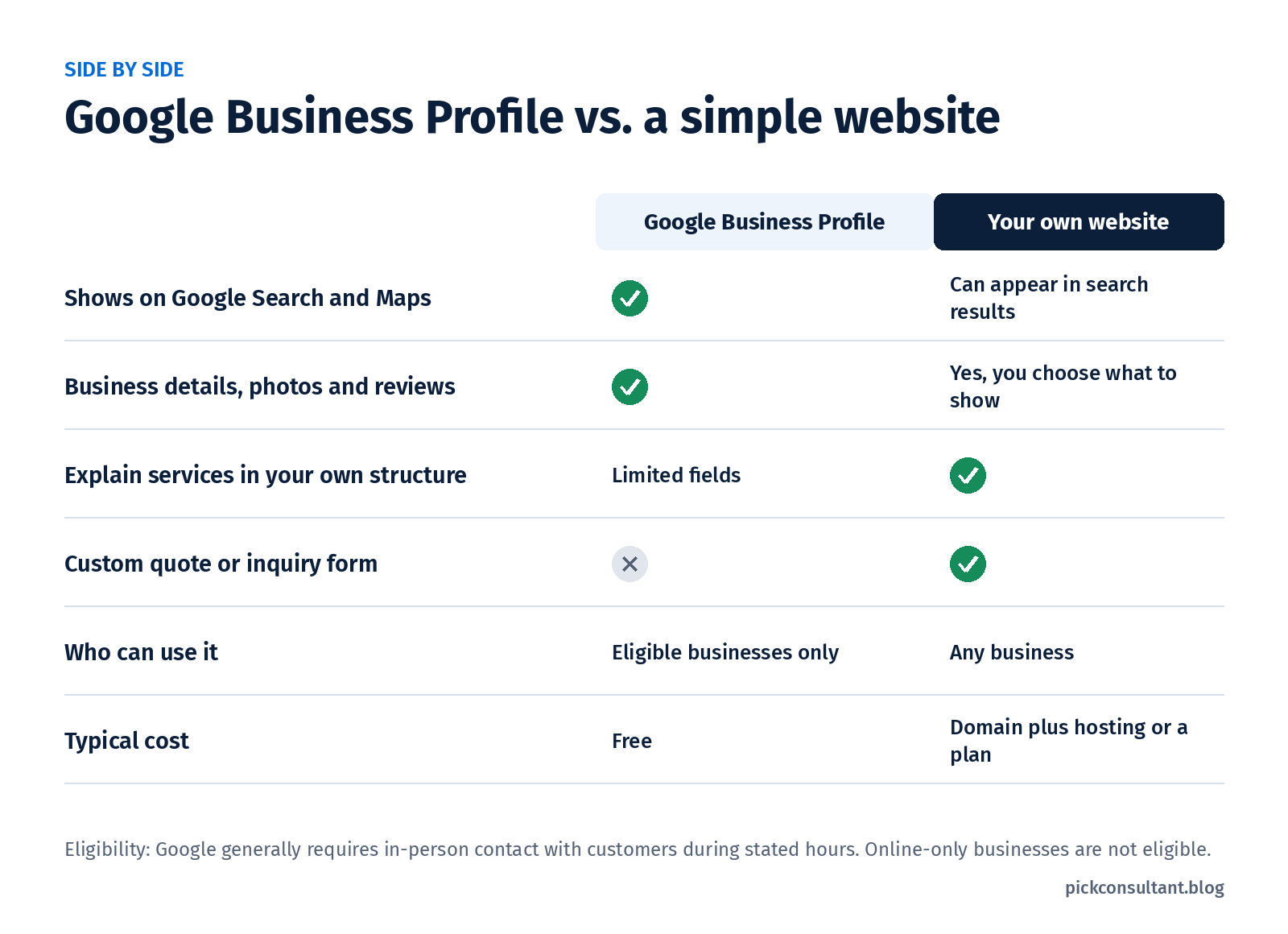
Google Business Profile lets eligible businesses present information on Google Search and Maps, including business details, photos, and reviews. It can help someone check your business and find a way to contact you.
Eligibility matters. Google's guidelines generally require in-person contact with customers during stated hours, subject to specified exceptions. A service-area business that visits customers is different from a consultancy operating exclusively online; Google lists online-only businesses as ineligible. Being home-based does not automatically establish eligibility.
A qualifying business can use a Google Business Profile without having a website. A profile can provide useful business information, but it does not offer the same flexibility to organize content and customer actions as your own website. Ask whether its available information answers the questions your customers actually have.
Directories and marketplaces
A relevant directory or marketplace may give your business a listing where people can review your offer and find a contact route.
Before relying on it, check what information the listing allows you to present, how someone reaches you, and any applicable fees or rules. If the listing answers the necessary questions and supports your current work, it may be sufficient for now. If it cannot explain an important part of your service, note that specific gap.
What would a website do that your current channels do not?
A useful website brings together information and actions that customers would otherwise have to piece together. The question is what you need it to organize.
Explain your services in one place
Imagine a cleaning company whose social posts show completed jobs but leave people asking whether it handles move-out cleans, brings supplies, or covers their neighborhood. A website could bring those answers together alongside a clear description of the service.
This is a hypothetical example, but the test is practical: which questions keep coming up, and where could you answer them clearly?
You do not need a separate page for every answer. A straightforward offer may need only a small amount of well-organized information. More varied services may need more explanation.
Give an interested customer a clear next step
Once someone understands your offer, what should they do? Call to check availability, describe a job, request a quote, or use an appropriate booking route?
A website can put that action beside the information that helps someone take it. A quote form, for example, could ask for the service required and the job location, if those details help you respond.
The business still needs someone to handle the inquiry. Adding a form without deciding who checks it and follows up leaves part of the customer journey unfinished.
What are the disadvantages of having a website?
A website adds costs and responsibilities. Understanding them before you start helps you choose a setup you can support.
Setup and ongoing costs
The initial build is only part of the commitment. Depending on the setup, ongoing costs can include domain renewal, hosting or a platform subscription, support, and paid features.
DIY can reduce some purchased work, but it still takes your time. Professional help also needs a defined scope: what you are paying for, what you must provide, and what happens after launch.
Before comparing prices, agree on what the site needs to do. Otherwise, you may be comparing quotes for very different amounts of work.
Upkeep and responsibility
Service information, contact details, and inquiry routes need to remain accurate. Technical tasks, including updates and security measures, depend on the platform and any support agreement.
Make sure you know which responsibilities belong to you and which a provider handles. Using your own domain gives you choices about your online presence, but it does not remove dependencies on registration, hosting, software, or service providers.
If nobody can keep information current or respond to inquiries, resolve that responsibility before adding another channel to manage.
What if your business already runs on referrals?
A referral introduces a potential customer to your business. An online presence can help that person understand what you offer and decide how to contact you.
For example, imagine a consultant whose referrals regularly ask what an initial engagement includes. A clear explanation online could help answer that question. But a business with a stable referral pipeline, no meaningful information gap, and no need for more work may reasonably decide to wait. Referrals alone are not a reason either to build a site or to rule one out.
Choose the next step that fits your business
If you cannot identify a meaningful information gap or a clear next step for customers, a new website may not be your most urgent priority.
Write a short answer to each question:
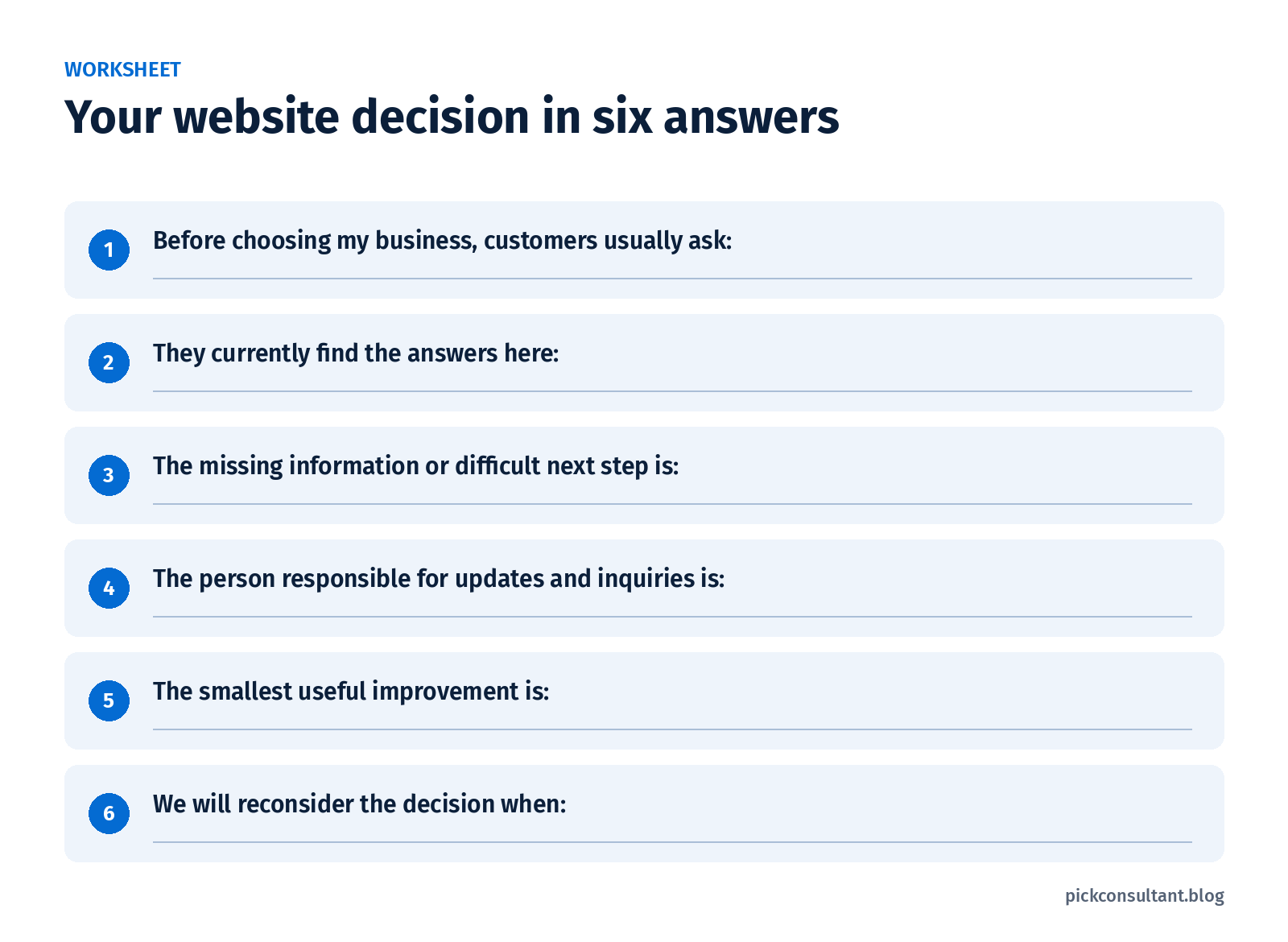
Use your answers to choose one action:
- Build now: define the website's purpose and requirements around the questions customers need answered and the action they should take. Choosing DIY, a freelancer, or an agency comes after that.
- Start small: identify the minimum useful service information and contact route. Add functionality when there is a clear need for it.
- Wait: improve your existing information and set a review trigger, such as a settled offer, recurring unanswered questions, or someone becoming available to manage the site.
If you decide professional help would be useful, Pick Consultant explains its approach to web design and development.